A downloadable tool

MC Cloud Dev App

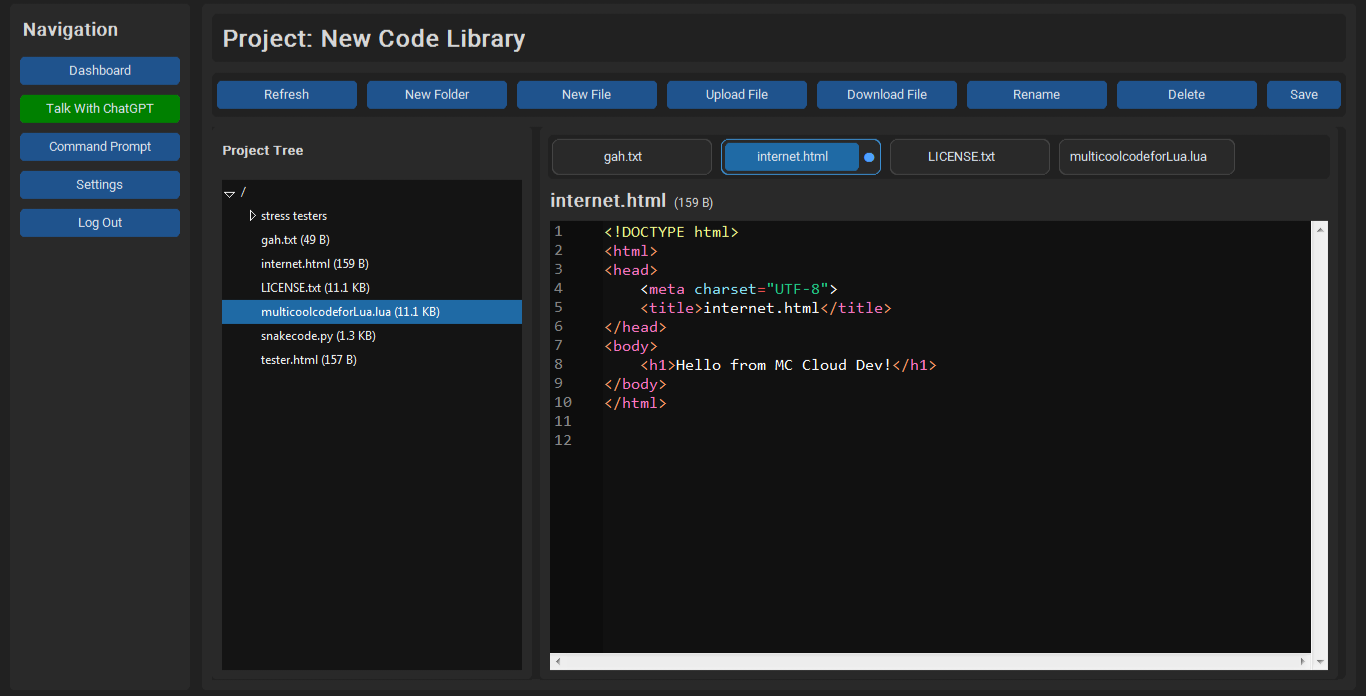
MC Cloud Dev is a cloud-based console you can use anonymously, and save your code through the cloud privately, you can even use it for typing normal text!

Features

Store text or code for up to 20MB in the Cloud!

Anonymous Login/Signup to use MC Cloud Dev Services


IMPORTANT:

If MC Cloud Dev Servers don't have enough space to store your data, there will be an option for you to download your data on your device until the problem has been resolved.

VERSION:

MC Cloud Dev 0.2.0 Beta

File Download Feature

- Download any selected file directly to your device

File Upload Feature

- Upload local files into projects folders

- Supports text/code files (UTF-8)

- Max upload size: 5 MB

Improved Project Tree Sync

- Automatically updates after file/folder changes

- Prevents ghost/stale UI Elements

Improvements

Scrollable Code Editor

- Added vertical + horizontal scrollbars

- Smooth navigation for large files

Editor Tabs Improvement

- Open multiple files with the updated tabs feature

- Active tab highlighting

- Tabs auto-clean when files are deleted

Better User Interface Responsiveness 

- Faster refresh after operations

- Cleaner state handling

BUG FIXES

- No Bugs Found from MC Cloud Dev 0.1.1

New Features:

Command Prompt

- New Button on the Navigation Bar for entering the command prompt custom-built into MC Cloud Dev (not many commands are available, but more are going to come soon as more features and bug fixes get added!)

- Syntax Highlighting 

- for Python, Lua, and HTML (it's not completed yet, but more syntax highlighters for different functions and code are coming for the respected languages)

Change Themes in Settings button and in Command Prompt

- You can now make the app theme to white or black by:

Go Into Settings -- Select Theme -- Save Theme

Go Into Command Prompt -- type /theme dark/light and it will be enabled.

Talk To ChatGPT

- Add Your OpenAI API Key on the "Talk To ChatGPT" Window and send prompts that could help you with typing code, or text in MC Cloud Dev! (Note That OpenAI Could bill you for usage of their API)

Select Language Feature

- When creating a new file in your selected Parent folder, it will give you an option to select:

Python, Lua, HTML, and None (for normal text)

if selected one of the languages, the syntax highlighting will be enabled for that specific language (will improve over time)


Comment on this post for bugs and issues and it will be dealt with if met with the correct conditions.

Supports Windows 7 and Above.


Updated 3 days ago
Published 5 days ago
StatusIn development
CategoryTool
AuthorMultiCool Studios
ContentNo generative AI was used

Download

Download
MC Cloud Dev.exe 24 MB

Install instructions

Download the .exe file

Windows may show a protection warning because this app is new.

To Run:

1. Click "More Info"

2. Click "Run Anyway"

This is normal for new apps without a digital signature.

Double-Click the file, and make your account (the email doesn't have to be real!)

After that, you're good to go!

Thank you for your attention.

Leave a comment

Log in with itch.io to leave a comment.